Spanning Tree Protocol, Pt1
Spanning Tree is probably one of the more expansive topics taught in the CCNA and Network+ exams. It's been retired from the CCNA objectives, so why are people still learning it?
6/23/20255 min read
In this post, I will explain how I remember STP and how it works, and in my next post I will explain why it's important to learn STP in 2025. This will be an information-dense post, so if you need to step away and take a break, please do so. I'll try to make it as concise as possible.
What is STP?
At it's core, STP is just a way to prevent Layer 2 loops within the network that can cause broadcast storms and MAC table instability that can bringing network traffic to a halt.
Since we're learning networking, let me give you a relatable scenario:
After a long, hard day at work, you just want to get home and relax. There's a several ways you can take, and usually you'd like to chose the one that's both fastest and has the least turns.
But what if someone's broken down, or the whole road you'd intended to take was closed because a water main broke and it's going to take the city a few days to repair it?
Traffic is gridlocked. You can no longer go on that nice, easy route you always take.
You now have two options:
Sit in traffic getting angry (a broadcast storm), or
Take an alternate backroad. It's slower, but hey-- you get home.
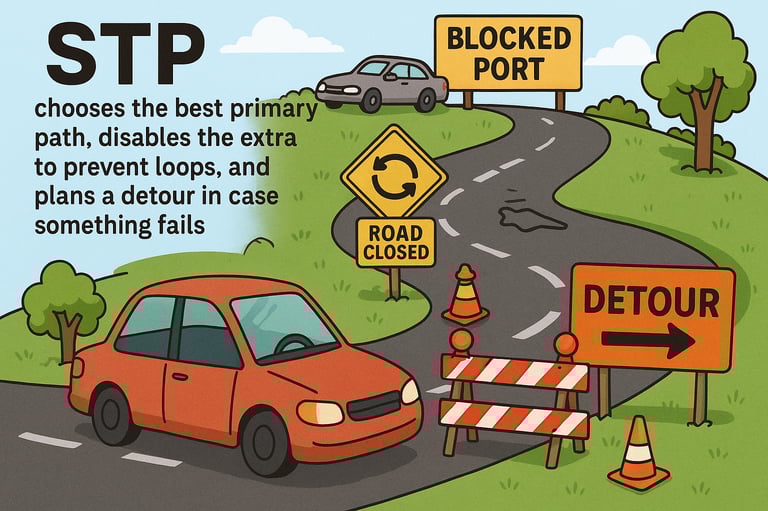
If your city planned ahead, they would have anticipated traffic jams and planned a failover. They would posted detour, pre-planned by your city's road works so you don't get stuck circling the same few blocks getting angry. You just want to get home and relax.
You see? Relatable.
Meanwhile, you get a headache and a grumbly stomach.
This is what STP does for us in the network: It acts as a traffic control system for our networks, choosing the best primary path, blocking redundant connections to prevents loops, and keeps a detour in case something fails.
Switches don't really care if you understand the frustrations of a detour, or turning so many times you ended up making a square. In fact, they probably think you should have been more prepared. Without STP, your network would be stuck in a gridlock.
One last note before we move on: Switches don’t get us out of the network — they help us navigate within it. We're not trying to reach a different city; we're just trying to get home. STP ensures we get there, without loops, storms, or crashes.
Key terms you need to know
To understand STP, you have to know the right vocabulary. Let's start some basics: bridge ports, root bridges, port roles, and trunking
A Bridge Port references an outdated technology called a Bridge. While we don't use physical bridges anymore, the concept remains in STP.
A root bridge is a central point for an STP topology. It's the starting point for all forwarding decisions, and where other switches within the tree calculate the best path towards. Switches exchange Bridge Protocol Data Units (BPDUs). These BPDUs contain their bridge ID, which is used to elect the root bridge. Ideally, the root bridge will be placed in the core of the network to minimize the disruptions from changes to the STP topology or configurations.
A root port always points to a root bridge. Points is the key word here. If we have a three switch setup, and SW1 as the root bridge. The ports directly connecting to SW1 on SW2 and SW3 will be the root ports.
The rest will be either non-designated ports or designated ports. Why? If one link to the root bridge fails, there will be a path in stand-by mode ready to pick up the slack.
A designated port is the "best" port on a link segment. All the ports on the root bridge are designated ports, and on the other switches, they are ports that are non-designated.
Since it'd be a waste to have bandwidth constantly running through all the interfaces, non-designated ports will be placed in a "blocking" state. Without the blocking state, we would run the risk of collision and switching loops as data passed through the switches.
An access port connects to end-user devices. Printers, computers, etc. all connect to an Access Port. They should be edge devices.
A trunk port transmits data from multiple VLANs using 802.1Q (dot1q). By encapsulating VLAN traffic using dot1q tags, many VLANs can share a single physical link.
📌 Don't confuse a trunk port with port trunking!
Port trunking is also called link aggregation. It combines multiple physical links into a single, reliable logical link. Why would this be important? It boosts bandwidth by bypassing the limitations that are placed on physical connections, resulting in fewer bottlenecks, fewer cables, and more resiliency.
How STP Port Selection Works
In a previous post, I mentioned how I heavily lean on algorithmic thinking. Let's look at an algorithm I made to understand how STP runs through port selection:
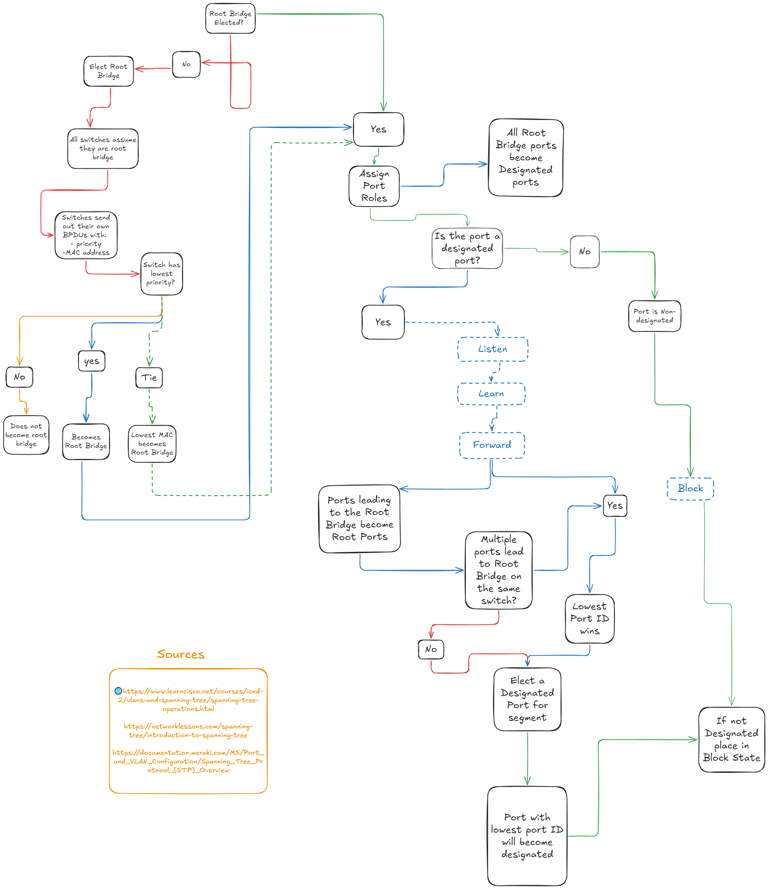
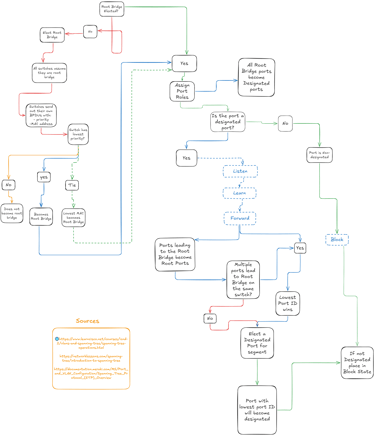
Let's walk through it together. You'll see it's not nearly as complicated as it seems.
First, all ports start with two assumptions:
They are blocking, and
They are on the root bridge.
From there, we can break this part into 4 big sections:
1. If a root bridge isn’t manually configured, STP holds an election.
Each switch sends out BPDUs advertising its Bridge ID (which includes its priority and MAC address).
The switch with the lowest Bridge ID becomes the root bridge
Lower priority wins
If priorities are equal, lower MAC address wins
📌 Tip: By default, all switches use priority 32768 . If you want to control the outcome, set a lower value on your core switch. You can find more information about priority here: [link tbd]
2. Select the Root Port (on Non-Root Switches)
Every non-root switch will identify one root port — the port with the lowest total path cost back to the root bridge.
If multiple paths exist, STP chooses:
Lowest total path cost
If tied, lowest sending bridge ID
Still tied? Lowest sending port ID
3. Elect One Designated Port Per Segment
On each collision domain (link segment in STP lingo), one port becomes the designated port — the one responsible for forwarding traffic toward and from that segment.
If the segment includes the root bridge, its connected port is automatically designated.
Else, the port with the lowest path cost to the root becomes the designated port.
The other port(s) on that segment go into blocking state.
📌 Designated ports send BPDUs downstream and help keep loop-free connectivity across segments.
4. Assign Port States: Forwarding or Blocking
Once roles are assigned, STP transitions ports through the appropriate states:
Root Ports and Designated Ports:
Start in blocking
Transition through the states: Listening → Learning → Forwarding
These are the active traffic paths
Non-designated Ports:
Remain in blocking
These ports are disabled to prevent loops
STP will continue to monitor the network using BPDUs, and should a switch receive a superior BPDU (aka, a better path to the root bridge), it may update its role or change its state. If a port stops receiving BPDUs altogether, it will assume that that link is down and block that path. It will then recalculate a new path.
In conclusion...
I do suggest you study more about STP, especially BPDU Hello times, Max Age of BPDUs, Topology Change Notifications (TCNs), and convergence speeds. I'll leave those as your "homework" for now, since we've already covered a lot. This will really help you understand more advanced topics such as PVST+ (Per VLAN Spanning Tree), RSTP (Rapid Spanning Tree) and MSTP (Multiple Spanning Tree). We will get to those in a later post, I promise.
In my next post, I'll cover why you should still be learning STP in 2025-- especially in real world networks and industrial systems. I really hope that I was able to help you visualize and understand the fundamentals of STP, and I'll see you next time!